Ford Radio Code
Drivers often look for a Ford radio code for the 6000 CD, 5000 RDS and Sony stereos. Depending on the unit, the serial number can start with M, V, BP, C7 or another prefix, so it is important to give the complete number.
- Label photos accepted
- Details checked before processing
- Orders accepted 24/7
- We contact you if anything is unclear
- Details checked before the code is sent
- No trip to a garage or dealer
- Orders accepted 24/7
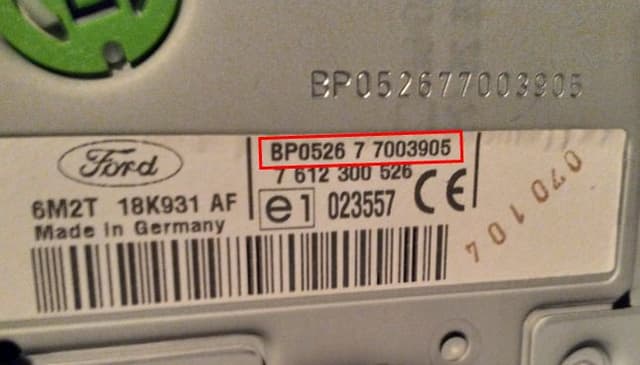
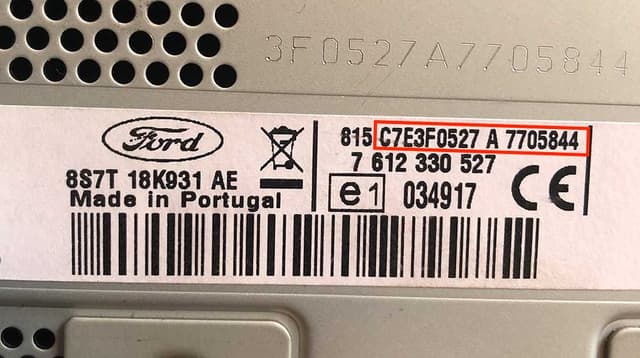
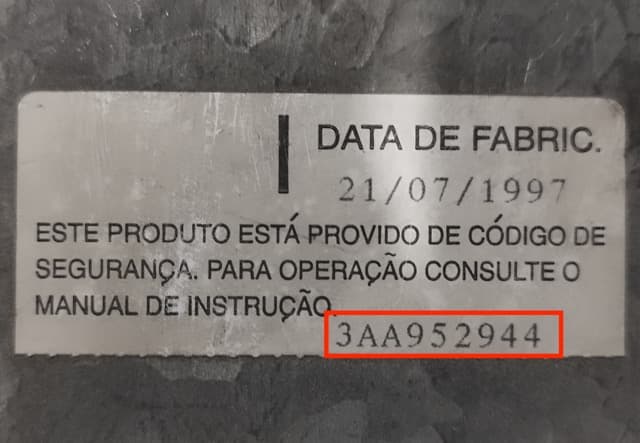
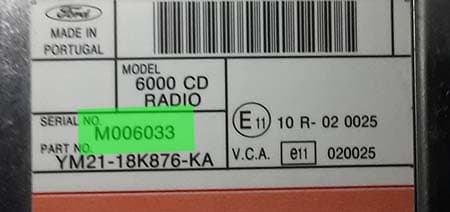
Ford radio label and serial number examples
Compare the label on your radio with these examples and look for the complete serial number. The Ford 6000 CD often has a V or M serial number; on some models it can be shown on the display. If you are not sure, you can add a photo of your own label or screen when you order.
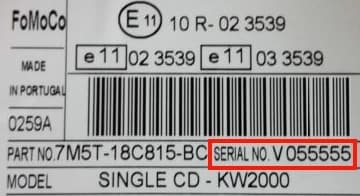
Ford radio code: what to know before you order
The Focus, Fiesta, Mondeo, Transit and other Ford models were equipped with different systems made by Visteon, Sony, Blaupunkt and other manufacturers. The same front panel design does not necessarily mean the same code calculation family.
After the battery has been disconnected or the radio has been taken out, the system may ask for a four-digit PIN. If several attempts have been incorrect, first wait until the unit lets you enter a code again.
Ford 6000 CD, 5000 RDS, Sony CD and TravelPilot codes
These Ford units are listed first so that the most searched radio models are one click away. Each unit has its own page with an order form.
How to get your Ford radio code
Find the serial number
Read the complete number from the radio label or the screen. If in doubt, take a clear photo.
Send the number or photos
Enter the serial number in the order form, or add 1–5 photos of the label and screen for checking.
Receive your radio code
Once the details are checked, the code is sent to the email address used for the order. If something does not match, we will contact you.
- Common manufacturers
- Sony, Blaupunkt, Visteon, Continental, Bosch, Clarion, Delphi
- Common systems
- 4000 RDS, 4500 RDS, 5000C, 6000 CD, 6006 CD, Sony, TravelPilot FX, TravelPilot NX
- Price
- £7.99
Where to find the Ford radio serial number
On Ford radios the identifier depends on the manufacturer: numbers in the M, V, C7, BP or FDC format are common. On older 6000 CD systems the number can sometimes be shown on the display using a button combination. On some Ford units the serial number can be shown on the display; on others you need the label. If the display shows only a short number, make sure you have also noted the letter prefix, because the digits alone are often not enough.
It is important to give the full prefix, not just the numeric part. If the number is shortened on the display, it is better to add a photo of the label.
Get your Ford radio code
Enter the radio serial number or, if you are not sure, add photos of the label or screen. Price – £7.99.
Ford radio codes by car model
Looking for information for a specific car? Choose the model. Each one has its own page with serial number guidance and the systems most often fitted.
All Ford radio models
The full list of supported Ford radios. Priority models come first, the rest follow.
Frequently asked questions about the Ford radio code
Can I get a Ford radio code from the car model alone?
The car model helps to narrow down the type of equipment, but for a reliable code the serial number of the radio that is actually fitted, or a photo of its label, is what matters most.
What if I do not know which number on the label is the serial number?
Do not guess. Add a clear photo of the whole label to the order form. If the details are incomplete or do not match, we will contact you before processing the order.
Does the Ford radio code change when the battery is disconnected?
As long as the radio itself has not been replaced, its factory security code normally stays the same. Keep the code you receive somewhere safe so that you have it the next time it is needed.
Can I order if I am not sure about the radio serial number?
Yes. You can add photos of the label or the screen. This is especially useful when characters are hard to read or the sticker shows several similar numbers.