Vauxhall / Opel CDR 500 Radio Code
Recover the security code for your Vauxhall CDR 500 radio online. If you are unsure about the serial number, add a clear photo of the label or the screen.
Ordering a CDR 500 radio code
This service is for lawful owners who have lost the factory security code after a battery disconnection, a repair or a radio replacement.
Before you order
- Write down the serial number exactly, without leaving out letters or digits.
- If the number is unclear, add a photo of the whole radio label.
- Use a valid email address in the order form – the code and any follow-up question are sent there.
- Typical Vauxhall identifiers: GM number, serial number and Security Code.
Vauxhall / Opel radio code – all supported models →
- We contact you if anything is unclear
- Details checked before the code is sent
- No trip to a garage or dealer
- Orders accepted 24/7
How to prepare your CDR 500 details for the radio code
This page is for the Vauxhall / Opel CDR 500 unit. Before you place the order, check that the model name on your radio matches the selected model and that the serial number is copied without missing letters or digits. If the model or the number raises doubts, it is better to send a clear photo of the whole label than to guess.
1. Check that the right model is selected
The unit selected in the order form is CDR 500. If the radio, its menu or its label shows a different model name, go back to the list of Vauxhall radios and choose the better match. This lowers the risk of sending details for the wrong unit.
2. Copy the serial number exactly
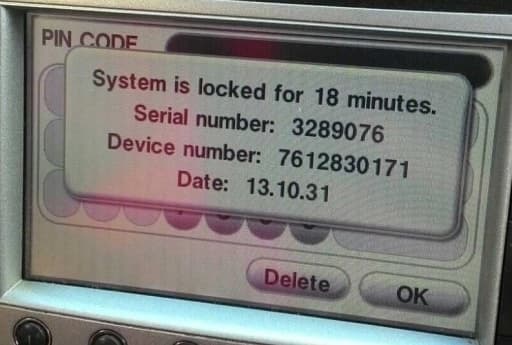
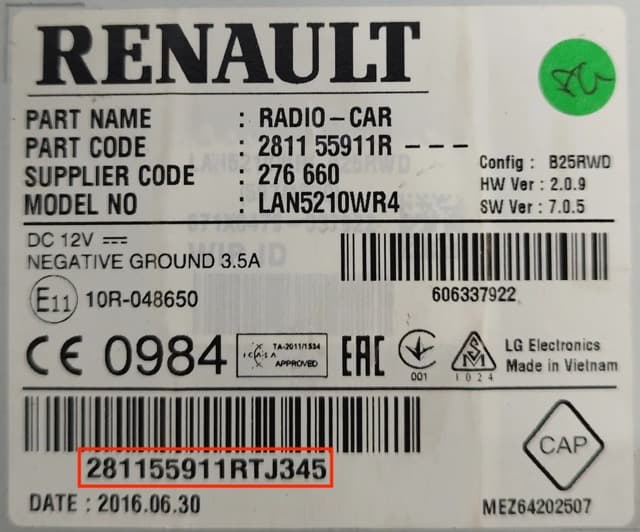
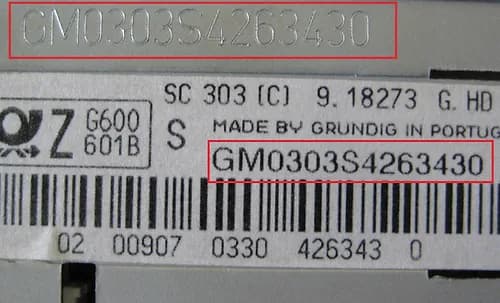
Typical identifiers on Vauxhall units are: GM number, serial number and Security Code. A label can carry several different numbers, so an unclear number should not be interpreted or shortened. Copy it exactly as printed, including letters, digits and their order.
Label and serial number examples
The Vauxhall examples below show what kind of information is worth photographing. They are not a guarantee that your CDR 500 label looks identical, so photograph the whole sticker or screen rather than one cropped number.
3. If you are unsure about the number, add photos
The order form lets you leave the serial number empty and add 1–5 photos. JPG, PNG and WEBP files of up to 8 MB each are accepted. The most useful photo is sharp, not taken from too far away, and shows the whole label or the whole screen with the identification details.
4. Check your email address
The radio code and any request to clarify the details are sent to the email address entered in the order form. Check it for typos before you pay. The price is a fixed £8.99, and orders are accepted 24/7.
Frequently asked questions about the Vauxhall CDR 500
Can I order the code if I am not sure about the serial number?
Yes. You can leave the serial number field empty and add clear photos of the radio label or screen. If the details are not sufficient, we will contact you by email before the order is processed.
Should I photograph only the serial number?
It is better to photograph the whole label. It can carry several codes and numbers, so the full picture gives more context and helps to avoid picking the wrong identifier.
How much does a Vauxhall CDR 500 radio code cost?
All supported Vauxhall models have the same fixed one-time price, shown on this page and on the payment page.
Who is this service for?
It is for lawful owners of the vehicle or the radio, and people authorized by them, when the factory security code has been lost or the unit asks for it again.
Other Vauxhall radio models
If your unit is not a CDR 500, choose another model or go back to the main Vauxhall page.
Questions about the serial number or an order: contact us.