Volkswagen (VW) Radio Code
A Volkswagen radio security code is most often needed after the battery has been disconnected or the radio has been removed or replaced. Whether you are looking for a VW stereo code, a VW radio code or a Volkswagen radio PIN code, the most important piece of information is the serial number of the radio itself, not just the model of the car.
- Label photos accepted
- Details checked before processing
- Orders accepted 24/7
- We contact you if anything is unclear
- Details checked before the code is sent
- No trip to a garage or dealer
- Orders accepted 24/7
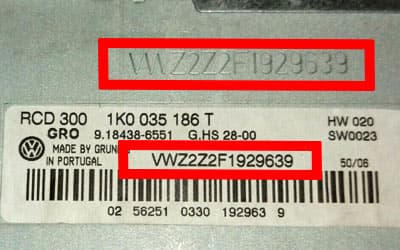
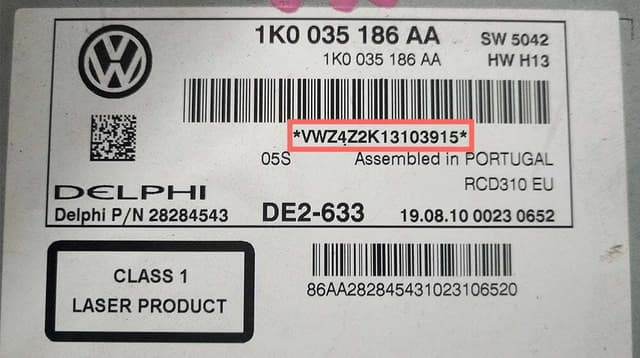
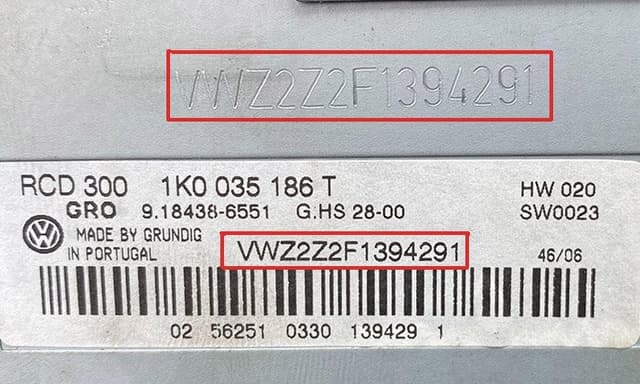
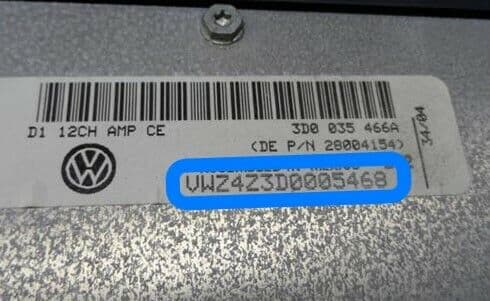
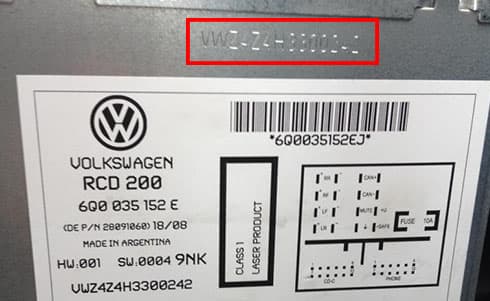
Volkswagen radio label and serial number examples
Compare the label on your radio with these examples and look for the complete serial number. A Volkswagen serial number usually starts with VWZ. If you are not sure, you can add a photo of your own label or screen when you order.
VW radio code: what to know before you order
The RCD and RNS families are especially common across the VW range. An RCD 510 code or an RNS 510 code has to be matched to the identification details of the individual unit, because radios that look identical in a Golf, Passat, Touran, Tiguan or Touareg can have a different manufacturer, series or part number.
After a battery change or repairs to the electrical system, the display may ask for the security code. If a different, used radio has been installed, you need the code for the exact unit that is in the car now; a PIN found in the previous car's documents will not necessarily work.
RCD 510, RNS 510, RCD 310 and RNS 315 codes
These VW units are listed first so that the most searched radio models are one click away. Each unit has its own page with an order form.
How to get your VW radio code
Find the serial number
Read the complete number from the radio label or the screen. If in doubt, take a clear photo.
Send the number or photos
Enter the serial number in the order form, or add 1–5 photos of the label and screen for checking.
Receive your radio code
Once the details are checked, the code is sent to the email address used for the order. If something does not match, we will contact you.
- Common manufacturers
- Bosch, Delphi, Continental, Panasonic, Harman, Technisat
- Common systems
- RCD 210, RCD 310, RCD 510, RNS 315, RNS 510, Composition Media, Discover Media, Discover Pro
- Price
- £14.99
Where to find the VW radio serial number
The Volkswagen serial number is usually on the label on the radio casing and quite often starts with VWZ. On some newer units, additional information can be found in the service menu. On a Volkswagen label, look first for the VWZ prefix and the complete sequence of letters and digits. If the label shows several numbers, do not guess; upload a photo of the whole label instead. That way the serial number can be told apart from the part number, and the risk of a wrong code is lower.
If you can see several numbers on the label, send a photo of the whole label. That makes it easier to tell the serial number and the part number apart.
Get your VW radio code
Enter the radio serial number or, if you are not sure, add photos of the label or screen. Price – £14.99.
VW radio codes by car model
Looking for information for a specific car? Choose the model. Each one has its own page with serial number guidance and the systems most often fitted.
All VW radio models
The full list of supported VW radios. Priority models come first, the rest follow.
Frequently asked questions about the VW radio code
Can I get a VW radio code from the car model alone?
The car model helps to narrow down the type of equipment, but for a reliable code the serial number of the radio that is actually fitted, or a photo of its label, is what matters most.
What if I do not know which number on the label is the serial number?
Do not guess. Add a clear photo of the whole label to the order form. If the details are incomplete or do not match, we will contact you before processing the order.
Does the VW radio code change when the battery is disconnected?
As long as the radio itself has not been replaced, its factory security code normally stays the same. Keep the code you receive somewhere safe so that you have it the next time it is needed.
Can I order if I am not sure about the radio serial number?
Yes. You can add photos of the label or the screen. This is especially useful when characters are hard to read or the sticker shows several similar numbers.