Jaguar XJ Radio Code
Recover the factory security code for your Jaguar XJ radio online. This page covers the systems most often fitted, the serial number format and how to prepare your order.
- Typical years
- 2003–2019
- Common systems
- InControl Touch, InControl Touch Pro, Pivi, Pivi Pro
- Radio manufacturers
- Denso, Visteon, Alpine, Harman
Where to find the Jaguar XJ radio serial number
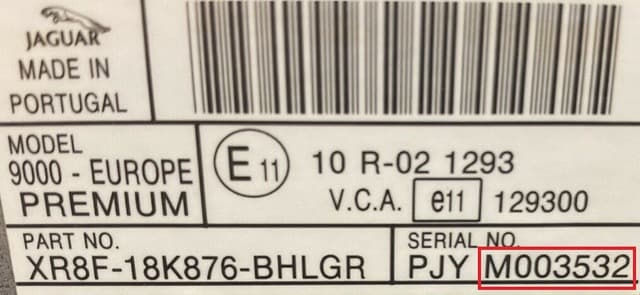
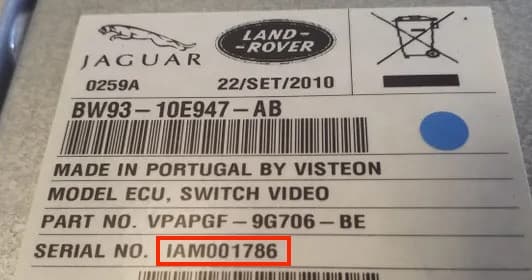
On Jaguar units the serial number is usually found on the label on the casing. The format differs between Denso and Visteon systems, so it is best to send the whole label.
If the radio has been replaced, a photo of the label helps to tell the original unit apart from one installed later.
What to check before ordering a Jaguar XJ code
Equipment varies by year and market, so the most important step is to identify the radio that is actually in the car.
Check the serial number
Copy the number exactly, with letters, zeros and the prefix. If it is hard to read, do not try to guess it.
Check the unit
The Jaguar XJ was fitted with several multimedia systems over the years, so the unit name and its label matter more than the car model alone.
Add photos
If you are unsure about the number, add 1–5 clear photos of the label or screen to the order form. If something does not match, we will contact you before processing the order.
Avoid repeated attempts
If the radio shows SAFE, LOCKED or a timer after wrong attempts, wait until the temporary lock ends and only then enter the verified code.
Common Jaguar XJ multimedia systems
The exact system depends on the model year, trim level and market. These are the Jaguar systems seen most often and worth recognizing before you order.
Jaguar XJ serial number examples
These numbers only illustrate the format. Do not use the examples below for your order – enter the serial number of your own radio.
How to get a Jaguar XJ radio code
Find the identifier
Read the serial number from the screen or from the radio label.
Place the order
Enter the number in the Jaguar order form below and add photos if needed.
Receive the code
Once the details are checked, the code is sent to the email address used for the order.
Order a Jaguar XJ radio code
Price – $11.99. If you are unsure about the serial number, leave it empty and add clear photos of the radio label or screen.
FAQ: Jaguar XJ radio code
Does the code depend on the car model?
The code is normally tied to the individual radio, so even the same Jaguar XJ can be fitted with different systems. That is why the serial number of the radio is checked.
Do I have to remove the radio?
Not always. Some systems can show the serial number on the screen or in a service menu; in other cases the label on the radio casing has to be read.
What if I do not know which number is the serial number?
Do not guess. Add a photo of the label or the screen to the order form. If the details are unclear, we will contact you by email before processing the order.
Can the same code be used after the battery is disconnected again?
If the radio has not been replaced, the recovered factory code normally stays the same and may be needed again after the next power loss.